
MyZio
iRhythm Technologies, Inc.Medical
4.61.65K Reviews
- Version
- 2.3.0-rc4
- Installs
- 500.00K
- Age Rating
- Everyone
Screenshots
Our Review of MyZio
 Analysis by Appyee
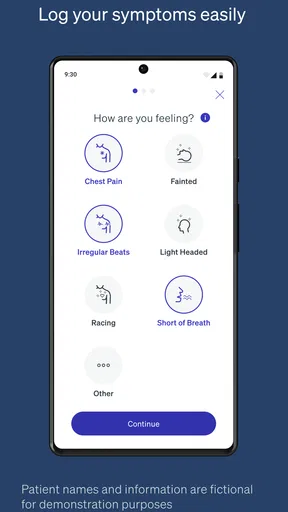
When a heart monitor is part of your day, the small details around it can matter almost as much as the device itself. MyZio is a free medical app from iRhythm Technologies, Inc. built to accompany the Zio monitor by giving you a place to record symptoms while monitoring is underway. I see its main value in that simple connection: instead of trying to remember later whether a flutter, skipped beat, dizzy spell, or unusual sensation happened during the day, you can log the event when it is fresh.
That makes this a very different kind of health app from a general heart-rate tracker. It is not trying to turn a phone into a diagnostic instrument, and it is not a replacement for medical advice. Its useful role is narrower and more practical: helping create a clearer record of what you felt while the Zio monitor was collecting heart activity. In my experience, that focused purpose is also the reason to judge it carefully. If you are using a Zio monitor and want a straightforward way to mark symptoms, it can fit naturally into your routine. If you are looking for live readings, exercise charts, or an all-purpose wellness dashboard, it is not the right tool.
Why symptom logging is the app’s important capability
The central capability is symptom logging alongside the Zio monitor. That sounds modest, but timing is the point. A symptom remembered at the end of a busy day is often vague: you may recall that something felt wrong, but not whether it happened after climbing stairs, while sitting quietly, or during a stressful conversation. Recording it close to the moment gives the monitoring process a more useful human reference.
I would think of MyZio as a personal event marker rather than a heart monitor in its own right. The Zio monitor handles the monitoring side, while the app gives you a practical way to identify moments that deserve attention when the results are reviewed. That division helps avoid a common misunderstanding. The app does not make a symptom meaningful by itself, and logging a symptom does not provide an instant diagnosis. Its job is to preserve context.
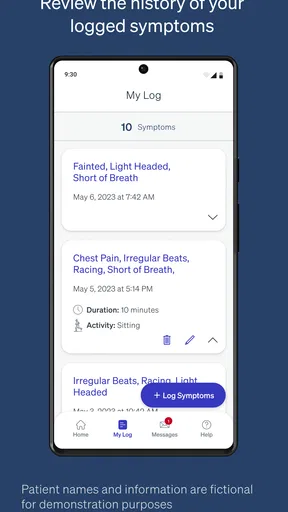
This is especially helpful for symptoms that come and go. Palpitations, brief racing sensations, lightheadedness, or an irregular feeling may disappear before you reach a clinic. A written diary can capture the same information, but a digital log is easier to make at the exact moment and less likely to become a collection of incomplete notes. The strongest benefit is therefore not visual polish; it is reducing the gap between feeling something and documenting it.
The most useful habit is to log promptly, not perfectly. You do not need to write a long explanation every time. A quick, consistent entry is generally more valuable than waiting until you can describe every detail. If the app presents a symptom entry flow, I would use it as soon as it is safe and convenient, then return to normal activity. The aim is to create a reliable timeline, not to make symptom tracking another source of stress.
What the app changes in an ordinary day
Imagine wearing the monitor during a normal workday. In the morning, you feel a short flutter while walking from the train to the office. Later, you notice a similar sensation while seated at your desk. Without a logging tool, both moments can blend together by evening. With MyZio available, you can mark each episode closer to when it occurs and preserve the difference between activity and rest.
That distinction can be useful when discussing the monitoring period with a clinician. The app does not interpret the event for you, but it helps you avoid presenting a vague statement such as “my heart felt strange several times.” A more useful account may be that one sensation happened during movement and another while resting, with different surrounding circumstances. The app’s contribution is making those observations easier to retain.
There is also a psychological benefit. People wearing a monitor can become hyperaware of every bodily sensation, especially during the first part of the monitoring period. A quick logging routine gives those moments somewhere to go. Instead of repeatedly wondering whether you will remember them, you can record them and continue with your day. That does not remove anxiety, but it can make the process feel more organized.
How I would use MyZio with the monitor
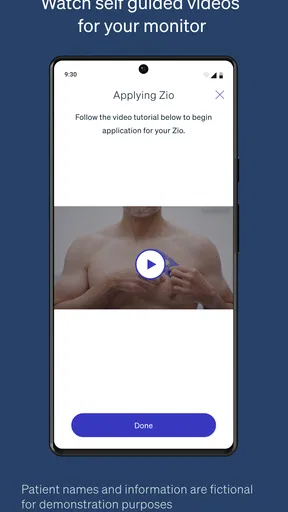
I would begin by treating the app as part of the monitoring routine rather than as a separate health journal. After setting up the Zio monitor according to the instructions provided with it, I would keep the phone accessible during ordinary activities. When a symptom occurs, I would open the app, choose the appropriate logging option, and enter the event as soon as practical. The exact value comes from consistency across the monitoring period.
One practical tip is to avoid postponing entries until bedtime. Delayed logging creates two problems: details fade, and several sensations can become difficult to separate. If you are driving, working with equipment, or in another situation where handling a phone is unsafe, wait until you can do so safely. The app should support the monitoring process, never interfere with basic safety.
A second useful approach is to preserve the surrounding context in your own memory or notes if the app’s entry options do not capture everything you want to remember. You might notice whether you were resting, walking, climbing stairs, lying down, or feeling unwell in another way. I would not assume that every detail can or should be entered inside the app. MyZio is most effective when used for the symptom event itself, while any additional observations remain concise and organized.
A third tip is to keep the logging standard consistent. If you record every minor sensation in great detail one day but only major episodes on another, the resulting timeline becomes harder to understand. I would decide on a simple rule before starting: log each noticeable episode, or log only symptoms that match the categories relevant to your monitoring instructions. If your healthcare professional gave you specific directions, those should take priority over my general workflow.
What happens when you open it at the moment of a symptom
The best user experience for this kind of app is measured in seconds, not in the number of screens it offers. When someone feels a possible rhythm-related symptom, they may be distracted, worried, or physically uncomfortable. A complicated process would defeat the purpose. MyZio’s value depends on making the act of recording feel less demanding than reconstructing the event later.
I found the focused design easier to understand than a broad wellness app would be for this job. General health platforms often surround a symptom with unrelated charts, exercise goals, sleep scores, and notifications. Those tools can be useful in other situations, but they also create visual noise. MyZio is centered on the monitoring relationship, so the user’s attention can stay on recording what happened.
That focus also sets a boundary. You should not expect the app to show a live interpretation of your heart rhythm or tell you whether a logged symptom is harmless. If you experience severe or urgent symptoms, an app entry is not a substitute for appropriate medical care. Logging is documentation, not triage. I consider that an important distinction for anyone deciding whether this app meets their needs.
The app’s store summary describes it as a companion for the Zio monitor, and that is the right mental model. It is not a standalone diagnostic service. The value appears when the monitor and the symptom record are used together, with the resulting information considered by the appropriate healthcare professional.
The strongest everyday scenario
The clearest use case is a person completing a period of Zio monitoring while continuing ordinary life. They may be commuting, working, shopping, exercising lightly, or sleeping at home, and symptoms may not follow a convenient appointment schedule. MyZio is most helpful when the event is brief and unpredictable, because those are exactly the moments most likely to be forgotten.
Consider someone who notices occasional palpitations but cannot describe a dependable pattern. A paper diary might work, yet it is easy to leave at home or fill out in batches. A phone is usually closer at hand. The person can record the symptom at the time, then return to the day without trying to analyze it. Later, the log can help them discuss the monitoring experience more accurately.
Another good scenario involves a user who is unsure whether several sensations were actually separate episodes. Recording each one as it happens can create a clearer sequence. That does not prove that every entry corresponds to a particular rhythm finding, but it gives the clinical review a better set of moments to consider. The app is therefore most valuable when the user treats it as a timestamped memory aid rather than a source of conclusions.
It can also help family members or caregivers support someone who finds symptom tracking tiring. One person may wear the monitor while another helps remember the routine or encourages timely entries. The person using the app should still follow the monitoring and healthcare instructions that apply to them, but a simple shared reminder can reduce missed logging opportunities.
When a different approach may be better
MyZio is not a strong choice for someone who wants continuous personal heart-rate feedback during workouts. A fitness watch or another wellness device may be better suited to exercise trends, activity summaries, or everyday pulse awareness. Those products serve a different purpose, and comparing them directly with MyZio would be like comparing a symptom diary with a stopwatch.
It is also not ideal for someone who is not using a Zio monitor. The app’s usefulness is tied to that monitoring context, so downloading it simply to explore general heart health would probably lead to disappointment. A general medical journal may be more flexible if you need to track medication, blood pressure, sleep, diet, or several conditions in one place.
People who dislike interacting with a phone during symptoms may prefer a paper record, provided they can keep it nearby and follow the instructions associated with their monitoring. Paper has one advantage: it works without opening an app. MyZio has the opposite advantage: it keeps the record with the device many people already carry. The better option depends on which method you will actually use consistently.
Limitations and trade-offs I would consider
The app’s narrow purpose is both its strength and its main limitation. It does not replace a conversation with a clinician, and it should not be treated as an emergency response tool. Someone expecting instant reassurance or an explanation for every sensation may find the experience unsatisfying. The app records an event; it does not turn that event into a medical answer.
There is also a human trade-off in symptom logging. Recording every sensation can make some users pay even closer attention to their heartbeat. For people who become anxious when monitoring their bodies, it may help to agree on a simple logging routine and avoid repeatedly reopening the app to review entries. The goal is useful documentation, not constant checking.
Another limitation is that the quality of the record depends on the person using it. A missed entry cannot be recreated precisely later, and a rushed entry may not capture the surrounding situation. That is not a flaw unique to this app, but it matters more here because the app’s value is built around timing. I would rather see a short entry made promptly than a detailed entry written long after the sensation has passed.
Phone compatibility is worth checking before relying on it. The current version is listed as 2.2.1-rc1 and requires Android 8.0 or later. That makes the app accessible to many Android users, but an older phone may need attention before the monitoring period begins. I would install it in advance, confirm that it opens properly, and avoid waiting until the monitor is already in use to discover a device issue.
MyZio is free, which removes a financial barrier for people who need the companion app. It is also rated for Everyone, although the medical context means younger users should still involve a parent, guardian, or healthcare professional when appropriate. A broad age label does not change the importance of following the instructions connected to the monitor.
What the public response suggests, with some caution
The app has an average rating of 4.6 from around 17 thousand ratings, along with roughly 1.6 thousand written reviews. That level of response suggests that many users find the basic experience useful, but I would not read the rating as a promise that every monitoring situation will feel effortless. Medical apps are especially dependent on the device, the user’s symptoms, and the instructions they receive.
It has passed half a million installs, which also indicates that it is not an obscure experiment. Still, popularity does not make it interchangeable with a general health tracker. The relevant question is whether you are in the Zio monitoring workflow and need symptom logging. If the answer is yes, the app’s focused design makes sense. If the answer is no, the same focus becomes a reason to skip it.
Who benefits most from this focused companion
I would recommend MyZio most readily to someone who has been asked to wear a Zio monitor and wants a simple way to mark symptoms as they occur. It is particularly suitable for people whose symptoms are intermittent, difficult to describe afterward, or likely to happen away from a clinic. The app can turn scattered memories into a more orderly account without asking the user to become a medical expert.
It is also a good fit for users who prefer a phone-based routine over carrying a separate notebook. The free price makes trying it straightforward, and the medical focus keeps it from becoming another general wellness dashboard. I would install it before the monitoring period, practice the basic logging flow once, and then keep the process deliberately simple.
I would be more cautious about recommending it to someone seeking diagnosis, emergency guidance, continuous fitness measurements, or a complete personal health record. Those needs call for different tools and, in some cases, direct professional care. MyZio works best when expectations stay realistic: it helps connect your reported symptoms with the period in which the Zio monitor is collecting information.
After using it as intended, my opinion is that the app succeeds because it does not try to do too much. The important feature is not a collection of elaborate charts; it is the ability to record a symptom close to the moment it happens. That can make an otherwise vague monitoring experience more organized and more useful to discuss later.
For Android users with a compatible device and an active Zio monitoring need, I think MyZio is worth using. I would not download it as a general heart-health app, and I would never use it as a substitute for urgent medical help. Within its proper role, though, it is a practical companion from iRhythm Technologies, Inc.: quiet, focused, and most valuable when a few seconds of timely logging can preserve information that memory would otherwise lose.
Privacy and Permissions
See what permissions an app requests and how it handles your data.
- Camera
- take pictures and videos
- Other
- view network connections, full network access, control vibration, prevent device from sleeping
Verdict
Strengths of MyZio
- Tracks heart rhythm continuously with a compatible wearable.
- Clear reports can help users discuss symptoms with a doctor.
- Useful alerts may highlight unusual rhythm patterns early.
- Supports long-term monitoring beyond occasional clinic visits.
- Designed to work with Zio cardiac monitoring devices.
Limitations of MyZio
- Requires a compatible Zio device and is not useful as a standalone app.
- Some features may depend on an active prescription or monitoring service.
- Wearable sensor use can be uncomfortable during sleep or exercise.
- Results are not intended for diagnosing emergencies or replacing medical care.
- Availability and support may vary by country and healthcare provider.
Similar Picks in This Category
View All
WebMD: Symptom Checker
WebMD, LLC4.1

Microphone Amplifier
DOSA Apps4.2

Anatomy Learning - 3D Anatomy
3D Medical OU4.5

Period Tracker and Calendar
SimpleInnovation4.9

GoodRx: Prescription Coupons
GoodRx4.8

CVS Health
CVS Pharmacy4.5
Frequently Asked Questions
What is MyZio and what is it used for?
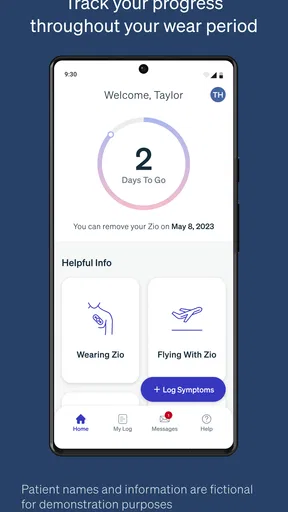
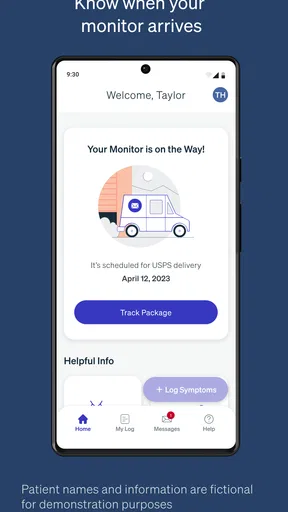
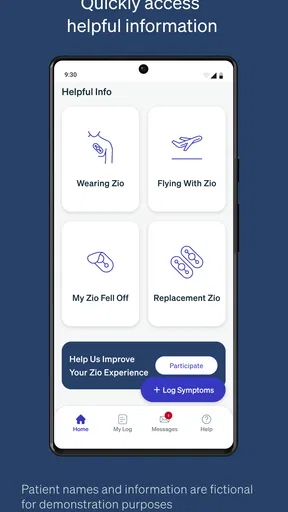
MyZio is a mobile health application designed to work with the Zio cardiac monitoring service. Depending on the device and service provided by your healthcare team, the app may help you review monitor instructions, complete setup steps, check monitoring status, and report symptoms or events while wearing the monitor. It is primarily intended for patients who have been prescribed Zio by a qualified medical professional, rather than for general fitness tracking.
Do I need a Zio monitor or a prescription to use MyZio?
In most cases, yes. MyZio is connected to the Zio monitoring program, so its main features are intended for patients who have received a Zio monitor through a healthcare provider. Simply downloading the app does not usually provide access to cardiac monitoring or enable it to diagnose heart conditions. Your clinic or service provider may give you activation details, instructions, or a specific monitoring kit required for the app to function correctly.
How does MyZio help while I am wearing the heart monitor?
The app can provide guidance related to using your Zio monitor and may allow you to record symptoms or notable events during the monitoring period. Accurate entries can help clinicians compare how you felt with the heart rhythm data collected by the device. The exact tools available may depend on your monitor model, account, and healthcare provider. Always follow the printed instructions and medical advice supplied with your Zio kit.
Can MyZio detect an emergency or replace medical care?
No. MyZio and the Zio monitor should not be treated as an emergency alert system, a substitute for a doctor, or a replacement for immediate medical care. If you experience severe chest pain, fainting, serious breathing difficulty, or another urgent symptom, contact local emergency services immediately. The app is intended to support prescribed monitoring and symptom reporting, while a healthcare professional must interpret results and decide what action is appropriate.
What should I check before downloading and using MyZio?
Before downloading MyZio, confirm that it is the official application associated with your Zio monitoring service and that your smartphone meets the current Android or iOS requirements. You should also have the patient information or activation details supplied with your monitor. Review the app’s requested permissions, keep your phone updated, and use a reliable internet connection when required. Availability, features, supported devices, and account access may vary by region and provider.
